Watch dynamics
This page explains the genuinely novel behavior of MyLoop With Watch: how the iPhone and the Apple Watch divide responsibility for talking to the pod and running the Loop algorithm. None of this exists in vanilla Loop.
The big idea: one driver at a time
At any given moment, exactly one device is the driver — the device that has an active Bluetooth connection to your pod and runs the Loop algorithm. The other device is the passenger — it shows status but doesn’t talk to the pod and doesn’t compute doses.
The two states:
- Phone-driving (the default): your iPhone is in range of the pod (typically within ~10 meters / 30 feet). iPhone runs Loop every five minutes. The watch shows the latest glucose + IOB but defers to the phone.
- Watch-driving: your iPhone is out of range or off, and the watch has taken over. Watch runs Loop every five minutes. Watch alerts fire on your wrist.
How to tell which device is driving
Look at the loop status ring on either device:
- A filled dot in the center of the ring (same color as the ring itself) = “this device is currently driving.”
- No dot in the center = “the other device is driving” (this device is the passenger).
The dot pulses gently for the brief sub-second window during which ownership is being handed off between phone and watch.
Same convention on both devices, so you always read the indicator locally: “is my phone driving?” check the iPhone’s loop ring; “is my watch driving?” check the Apple Watch’s loop ring. If both rings show a dot at the same time during normal operation, that’s a split-brain condition the system detects and resolves automatically (phone wins).
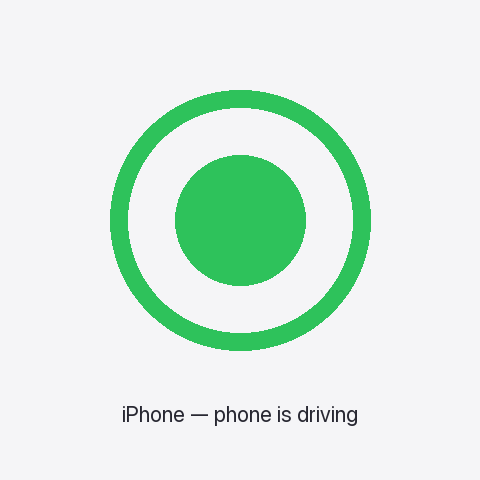
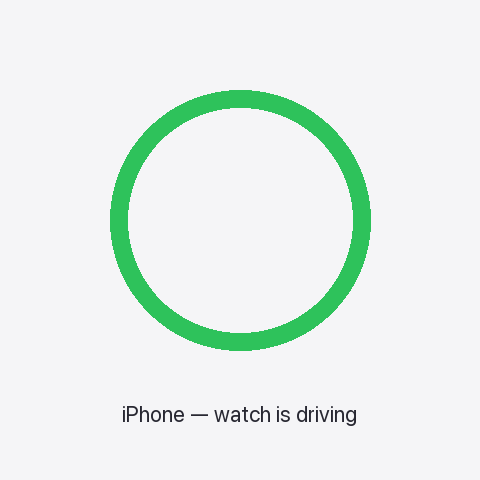
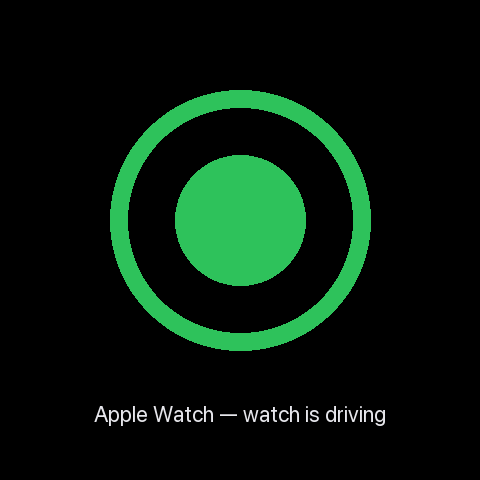
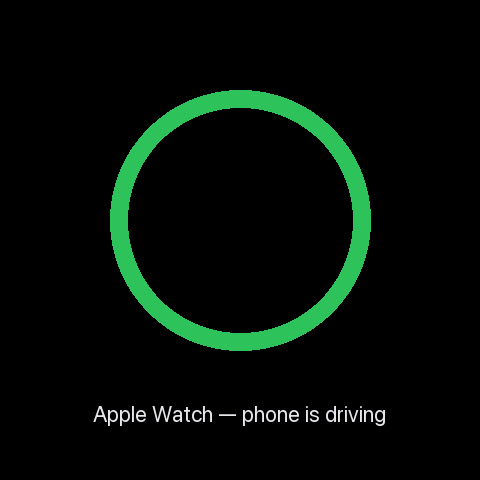
Mockups above show only the ring and indicator; the live HUD includes glucose, IOB, and other status around it. Real on-device screenshots will replace these after hardware verification.
Handoff: how the watch takes over
Handoff is the moment when the driver role moves from one device to the other. Two paths trigger it:
- Automatic, on phone disconnect. When the phone has been out of Bluetooth range of the pod for several minutes, the watch notices, requests the BLE bond, and takes over. This is the typical bedtime case.
- Manual, in the watch app. You can initiate a handoff from the watch’s settings. Useful for testing, or for cases where you want the watch to take over before walking out of range.
When handoff happens, the BLE connection physically moves from the phone to the watch. The bonding-handoff orchestrator in MyLoop ensures only one device owns the bond at a time, so the pod never sees conflicting commands.
Lifecycle overview
This is the state machine each device runs. Both phone and watch run the same code (the handoff stack is consolidated in a shared module parameterized by role); the diagram applies to either.
stateDiagram-v2
    direction LR
    [*] --> PhoneDriver: app launch (default role)
    PhoneDriver --> HandoffPending: phone offline ≥ 60s\nor user-initiated
    HandoffPending --> WatchDriver: counterpart confirms\n(< 30s window)
    HandoffPending --> Recovering: timeout / rejection
    WatchDriver --> HandoffPending: phone reachable ≥ 60s\n(reverse handoff)
    Recovering --> PhoneDriver: user dismisses banner\n(if last owner = phone)
    Recovering --> WatchDriver: user dismisses banner\n(if last owner = watch)

    note right of HandoffPending
        Both sides suppress
        pod commands during
        the transition window
    end note

    note left of Recovering
        After app restart, any
        previously-pending handoff
        is treated as expired —
        recovery banner shown
    end note
Three safety properties baked into the lifecycle:
- Pod commands are suppressed during the transition window. Bolus, cancel-bolus, suspend, and resume all return a “try again” error if invoked while a handoff is pending. The previously-driving device resumes normal command authority after the transition completes or recovers.
- Crashes mid-handoff always recover safely. If the app restarts during the sub-second transition window, the persisted state is treated as expired and the user sees a recovery banner instead of an ambiguous mid-flight handoff. Worst case is “user dismisses banner”; the system never resumes a half-finished transition.
- Settings stay fresh on the watch. Edits you make on the iPhone (target range, ISF, max bolus, etc.) propagate to the watch within one Loop iteration — about 30 seconds — without forcing a handoff.
Warming up: the first few iterations after handoff
When the watch becomes the driver, it needs recent glucose, dose, and carb history to compute a Loop iteration. Two paths:
- Skip-warmup (the fast path). If the watch has a fresh algorithm-state snapshot from the phone (one is pushed at the end of every phone iteration, ≤ 7 minutes old), the watch hydrates its stores from the snapshot and runs a full Loop iteration immediately. No warmup badge appears.
- Full warmup (the safe fallback). If no fresh snapshot is available — for example, the watch app cold-launched while the phone is offline — the watch displays a “Loop warming up” badge for the first few iterations (about 30 minutes) while it backfills recent glucose from the CGM and recent dose events from the pod.
While the warmup badge is showing:
- The algorithm is running, but on conservative defaults.
- Closed-loop dosing decisions are smaller / more cautious than they would be with full history.
- Glucose alerts fire normally.
After the warm-up window completes (or the snapshot fast-path succeeds), the badge clears and the watch operates with full algorithm context.
A runtime equivalence test (LoopAlgorithmReconciliationTests)
verifies that the watch’s Loop computation produces byte-identical
output to the iPhone’s for the same input — across steady-state,
post-meal-carb, and predicted-hypo scenarios. This catches any future
drift between the two consumers of the shared algorithm code.
What happens when phone + watch are separated
The intended scenario: you go to bed with your phone on the bedside table, then leave the room. Your watch stays on your wrist. As you walk away, the phone loses its BLE connection to the pod; the watch detects this and initiates handoff. Within a few minutes, the watch is the driver and Loop continues uninterrupted.
While you’re separated:
- Glucose continues to update on the watch.
- Dosing decisions continue, computed on the watch.
- Alerts fire on your wrist.
- The phone may show “watch is currently driving” if you check it.
- If the watch has LTE or Wi-Fi, uploads to Nightscout continue directly from the watch. Caretakers see live data even with the phone fully offline. (Wi-Fi-only watches lose this until the phone reconnects.)
Cold-launch while phone is offline
If you reboot or relaunch the watch app while your phone is unreachable, the watch can still bootstrap the Loop driver. The most recent settings sync from the phone is persisted to a shared App Group container on the watch, so the watch reconstructs its therapy parameters (ISF, CR, target range, max basal/bolus, suspend threshold) from disk without needing a fresh handshake. If you’ve been using the system for a while and the watch has ever been synced, this works even when the phone is across the house, dead, or in the next room.
The only case where bootstrap fails is “the watch has never received a single settings sync” — e.g., a fresh install with the phone offline. In that case the watch waits with the warmup badge until a sync arrives.
Reverting to phone-driving
When you return and the phone is reachable from the watch over Apple’s WCSession transport for at least 60 seconds, the reverse handoff fires automatically: the phone takes the BLE bond back, and the watch reverts to passenger. The 60-second debounce avoids flapping during brief reconnect storms.
Same warming-up window applies in reverse — the phone’s first iteration after taking back the role uses its existing history, so warming up is usually not visible.
The auto-revert behavior is governed by the handoff mode setting
(default: automatic). If you set the mode to manual, the watch
keeps the driver role until you initiate a handoff back to the phone
explicitly via the watch’s settings.
Remote care: driver owns the network
If you’re a parent (or partner, or school nurse) and the Looper is across the house — or across town — caretaker visibility and remote commands work the same way regardless of whether the iPhone or the Apple Watch is the BLE driver. Whichever device is driving is also the one that uploads to Nightscout and processes remote commands. The other device stays silent on the network the same way it stays silent on Bluetooth.
In plain terms: a phone sitting at home with no signal does not cut caretakers off, as long as the watch is the driver and the watch has LTE or Wi-Fi. The watch uploads directly. Caretakers see continuous status; remote-bolus / remote-carb / remote-override commands land at the watch and are executed on the next loop cycle.
Hardware requirement
This symmetry depends on the watch having its own internet path — an LTE Apple Watch (cellular plan) is required for full remote-care during watch-driving. A Wi-Fi-only Apple Watch that loses its phone tether continues to drive the pod locally, but caretakers will not see uploads or be able to send commands until the phone reconnects. The dynamics page tells you which device is driving; if you have a Wi-Fi-only watch, treat watch-driving + phone-offline as a “caretaker-blind” condition.
How driver-routing works under the hood
Each device publishes its APNs push token. Every Loop iteration, the
driver writes a small object to Nightscout’s devicestatus
recording both tokens, who is currently driving, and an HMAC
signature against your Nightscout API secret:
loop.testingDetails.driverToken = {
  phone:  { token, expiresAt, lastSeen }
  watch:  { token, expiresAt, lastSeen }
  currentDriver: "phone" | "watch"
  signature: <HMAC-SHA256>
}
Caretaker apps and Nightscout’s loop plugin read this field, verify
the signature, and target the current driver’s token when sending
remote commands. During a handoff, the outgoing driver writes the
new currentDriver value to Nightscout before the BLE bond moves,
so caretaker polls always learn the new driver before they need to
send anything to it.
If the pre-handoff publication fails (transient network), the role
still flips and the new driver re-stamps currentDriver on its first
upload — caretaker visibility self-corrects within ~5 minutes. Pump
commands stay short-circuited during the transition window so nothing
double-executes.
Caretaker app status
The driver-token field is brand-new (Build 888, 2026-05-04). For the upstream caretaker apps to actually use the field, they need a small upgrade. Status as of Build 888:
| Pathway | Today’s behavior | After upstream PR lands |
|---|---|---|
| Nightscout Care Portal (LoopDocs) | Targets the QR-captured phone token. Phone-driving works; watch-driving is invisible. | Server-side change to Nightscout’s loop plugin to read driverToken and target currentDriver. One PR; benefits all Care Portal users + Loop Caregiver indirectly. Open as backlog item F.1a. |
| Loop Caregiver (LoopKit/LoopCaregiver) | Routes commands via Nightscout, so it inherits whatever Nightscout’s loop plugin does. |
Automatically benefits from F.1a — no app-side change needed. |
| LoopFollow (loopandlearn/LoopFollow) v4.0+ | Direct-APNs path bypasses Nightscout; targets the QR-captured phone token. | Independent app-side PR (F.2) teaching the direct-APNs path to read driverToken and target currentDriver. |
| Nightguard / NightWatch (nightscout/nightguard) | Display-only on a cellular Apple Watch. No commands. | Unchanged — display-only follower, no driver-routing concern. |
Until F.1a and F.2 land upstream, MyLoop on Build 888 ships the
publishing half of symmetric remote care: caretakers can see
which device is driving, watch-driving uploads now reach Nightscout
directly, and the handoff handshake correctly stamps currentDriver
in the right order. The command-routing half waits on the
upstream caretaker-app PRs.
Backward compatibility
Caretaker apps that don’t know about driverToken continue to use
the QR-captured phone token. This means phone-driving caretaker
integration is unchanged from Build 883 — no regression. Only
watch-driving + remote commands needs the upstream PRs.
What to do if handoff doesn’t happen
If you check the watch and the badge says it’s still in passenger mode after the phone has clearly gone out of range:
- Wake the watch and open the MyLoop app.
- Wait 30–60 seconds for the watch to detect the disconnect.
- If still no handoff, manually initiate handoff via the watch’s settings (see Troubleshooting for the gesture path).
- If manual handoff also fails, fall back to manual insulin delivery and contact Carl.
What is NOT yet supported
- Algorithm-level differences between phone and watch (the watch runs the same Loop algorithm with the same settings; nothing diverges).
- Multiple pods at once (one pod, one driver at a time).
- Handoff to a non-paired second iPhone (only paired Apple Watch).
- Critical Alerts on the watch when in Focus modes — this entitlement is pending Apple approval; for now use Focus exemptions or rely on the watch’s haptic alerts.
- Watch-driving caretaker remote commands targeting the watch’s APNs
token. The publication side ships in Build 888 (
driverTokenfield in Nightscoutdevicestatus), but the upstream caretaker apps (Nightscoutloopplugin, LoopFollow direct-APNs) need PRs to read the field. Until those land, watch-driving + remote commands works only if the phone has network and can forward APNs to the watch via WCSession. - Wi-Fi-only Apple Watch direct-uploads when the phone is unreachable. An LTE Apple Watch is required for the watch to upload to Nightscout while the phone is offline.
Last updated: 2026-05-04 — Build 888 (covers B.8.1 through B.11).
Watch behavior verified on hardware: pending consolidated HV-1
session. The handoff lifecycle described above applies to Build 888
(uploaded 2026-05-04). Build 888 adds the B.11 symmetric remote
care umbrella on top of Build 883: watch APNs entitlements + token
publication (B.11.0); role-parameterized RemoteCareUploader with
driver-only-writes invariant (B.11.1); HMAC-signed driverToken
rendezvous in Nightscout devicestatus with token rotation
propagation (B.11.2 + B.11.2.1); pending-driver handshake that
publishes currentDriver: <incoming> before the BLE bond moves so
caretaker polls always see the new driver before sending commands
(B.11.3, fire-and-forget with idempotency-on-first-iteration safety
net).
_Build 883 baseline (carried forward): live LoopSettings observer
- dedup; persisted last-good settings; snapshot-driven skip-warmup
(real algorithm-state hydration via per-iteration buffers);
file-pointer fallback for oversized snapshot payloads;
commandsAllowedCheckgate on resume/suspend/cancel-bolus during handoff transitions; always-recover after restart; iOS↔watch algorithm reconciliation test (3 fixtures, byte-identical assertion); consolidated handoff stack (single shared module, both phone and watch run the same code parameterized by role)._
Earlier shipped behavior: B.7 driver indicator (Build 872), B.8 watch warmup elimination via algorithm-state snapshots (Build 872). Auto-revert from watch back to phone shipped in Build 860.
Pending upstream caretaker-app work: F.1a (Nightscout loop plugin
PR — server-side driverToken routing, benefits Loop Caregiver
indirectly) and F.2 (LoopFollow direct-APNs PR — independent of F.1a).